Converts The Centronics Interface On High Speed Lineprinters To Dataproducts Style Interface
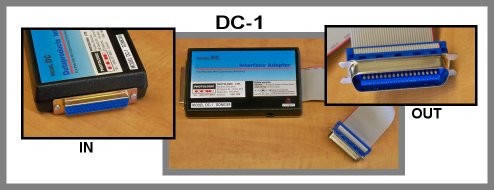
Model DC-1
Dataproducts To Centronics Interface Converter
Converts The Centronics Interface On High Speed Lineprinters
To Dataproducts Style Interface
Allows you to replace your older lineprinter with a new
impact or laser printer using the more common Centronics interface.
- Installed On 2,000 Line/Minute Impact Printers And Non-Impact Printers Up
To 90 pages/minute.
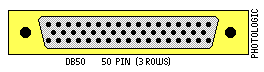
Output:
- LPT Centronics Parallel
- 36 Pin Male Connector
Installation:
- No software is required.
- No adjustmets are required on the printer
1. Remove from the shipping box and plug onto the printer.
2. Plug in the 9 Volt DC Power Adapter.
3. Connect your Dataproducts printer cable to the Model DC input
and begin printing.
-Laser Printers May Require Set Up To Format The Number Of Print
Columns, And Lines/Page.
The
Model DC-1 may be used with such minicomputer systems such as:
Digital Equipment VAX, Digital PDP-11, Data General MV, Prime,
Gould, SEL, Encore, and
custom systems.
High Speed Lineprinters Over 300 Lines/Minute may include :
Fujitsu, Genicom, Hitachi, Dataproducts, Mannesmann-Tally,
OTC, Printronix, C.Itoh
Laser printers Over 20 Pages/Minute may include :
Kentek, Dataproducts, Hewlett-Packard, Mannesmann-Tally, Genicom, and others

If you're moving a lineprinter to
your new system then you'll want to know about our adaptors.
Photologic adapts all sorts of lineprinters equipted with unusual or exotic
interfaces.
Tel: (905) 377-8915, email here: rick@photologic.ca
Photologic Ltd.
Federal Building
39 Queen St., Suite 214
Cobourg, Ontario
Canada K9A-1M8
Tel: (905) 377-8915